If you’ve ever set up a bot to grab Pokémon cards and walked away with an empty cart, proxies were probably part of the problem. They’re one of the most misunderstood parts of any botting setup, and getting them wrong is one of the fastest ways to burn money without securing a single restock. This guide breaks down the main proxy types used across the Pokémon botting community, what each one is actually good for, and roughly what they cost. By the end, you should know what to buy and why, rather than just copying what someone in a Discord server told you to grab.
Why Proxies Matter for Botting
When a bot runs, it sends a lot of requests in a very short time. Without proxies, every one of those requests comes from the same IP address, and retailers can spot that pattern almost instantly. Once flagged, that IP gets blocked and every task tied to it dies at once. Proxies solve this by giving each task its own IP address, so the traffic is spread out instead of all coming from one connection. More tasks staying alive means more chances at a successful checkout, and that’s really what proxies are for.
The tricky part is that not all proxies behave the same way, and using the wrong type on the wrong site can tank your success rate even if the bot itself is solid. Some proxies prioritise speed, some prioritise looking like a normal home connection, and some try to balance both. Picking the right one usually comes down to understanding what the retailer’s anti-bot system is checking for. If you’re still deciding whether botting is worth it in the first place, our guide on the best bot for Pokémon Center is a good place to start before you spend anything on proxies.
ISP Proxies Explained
ISP proxies are hosted in commercial data centers but registered to real internet service providers, the same companies you’d get home broadband from. That means they have the speed of a data center connection while still looking like a home internet connection to retailers. It’s the best of both worlds, which is why they’ve become the go-to choice for a lot of serious Pokémon Center botters. They’re stable, fast, and far less likely to get flagged than a plain data center IP.
The catch with ISP proxies is the price and how they’re sold. You’re usually buying fixed IP addresses on a monthly subscription, so the IP stays the same for as long as you’re subscribed. That’s actually a benefit in situations like a Pokémon Center queue, where switching IP mid-queue can get you kicked out. At the time of writing, Aurum Proxies sell 25 ISP proxies for around £40 to £45 a month, while Byte Proxy offers a similar package for closer to £32 to £36, making it a slightly cheaper entry point for newer botters.
| Provider | Proxy type | Quantity | Approx price | Best use case |
|---|---|---|---|---|
| Aurum Proxies | ISP | 25 | £40 to £45/mo | Pokémon Center queues |
| Byte Proxy | ISP | 25 | £32 to £36/mo | Budget ISP option |
| Aurum Proxies | Data center | 25 | £25/mo | Lightly protected sites |
| Icey ISPs | Data center | 25 | £31/mo | Multi-type provider testing |
| Icey ISPs | Residential | Pay as you go | £2.50/GB | Sites with strict bot detection |
| Aurum Proxies | Residential | Pay as you go | £5/GB | Premium residential pool |
When to Use ISP Proxies
ISP proxies make the most sense whenever you need your IP address to stay the same throughout checkout, which is exactly what Pokémon Center queues need. They also work well on sites protected by Cloudflare, where a fast, stable connection that looks residential tends to get through without much trouble. If you run a bot around the clock across lots of drops, the fixed monthly cost can work out cheaper than constantly topping up bandwidth on other proxy types.
Data Center Proxies Explained
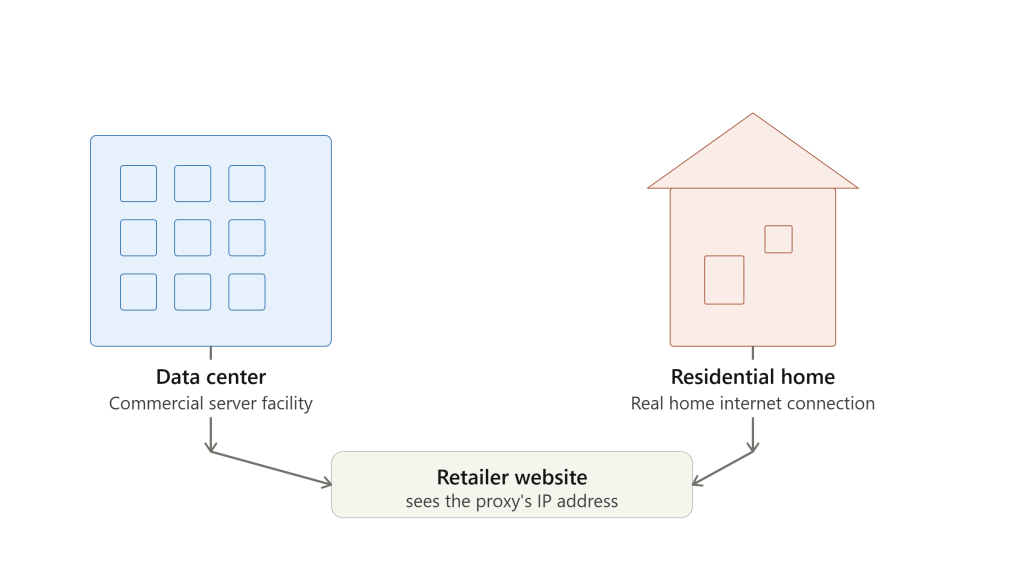
Data center proxies are hosted in the same kind of facilities as ISP proxies, but they aren’t registered to a home internet provider. That makes them the fastest option on this list and usually the cheapest too, which is why they’re so widely used across botting in general. The downside is that they’re much easier for advanced anti-bot systems to detect and block, so they work best on sites with lighter protection rather than heavily defended retailers.
Data center proxies are priced like ISPs: you pay monthly for a fixed batch of IP addresses rather than by usage. At the time of writing, Aurum Proxies offer 25 data center proxies for roughly £25 a month, and Icey ISPs sell data center proxies from around £31 for a batch of 25. Despite the name, Icey ISPs is a multi-type provider, so “ISP” is just part of the brand. They’re a solid option if you want to test a few different proxy types from one dashboard rather than juggling several providers.
Residential Proxies Explained
Residential proxies route through real devices on real home internet connections, which makes them the hardest type to flag. Because the traffic comes from actual households rather than a data center, even sites with aggressive bot protection like Akamai are much less likely to block it. The tradeoff is speed: home connections are slower and less consistent than data center infrastructure. For heavily protected checkout pages that tradeoff is usually worth it, but for queue systems where speed and a stable IP matter more, residential proxies can work against you.
Pricing works completely differently here. Instead of renting a fixed number of IPs, you pay for the bandwidth you use, like a mobile data plan. That gives you access to huge pools of IPs for very little if your usage is light, but heavy use across a round-the-clock setup can rack up a surprisingly big bill. At the time of writing, Icey ISPs sell a private plan at roughly £2.50 per GB, while Aurum’s premium residential tier is closer to £5 per GB, so it’s worth shopping around for the right balance of price and pool quality.
Why Residential Proxy Quality Varies
Something that catches a lot of newer botters off guard is that most proxy sellers don’t own the residential IP pools they sell. Many smaller providers buy bulk access from larger networks and repackage it under their own basic, elite or private plans.
That means two providers can end up selling you access to the exact same pool, and if that pool has a poor reputation on a particular retailer, switching providers won’t fix it. Testing a small amount of bandwidth before committing to a bigger package is the safest way to avoid wasting money on a pool that doesn’t work for your target site.
Which Proxy Type Should You Use
For Pokémon Center, ISP proxies tend to be the safer bet because a stable IP matters so much in the queue, though some botters still run data center proxies successfully depending on the drop. Sites with tougher anti-bot systems generally call for residential proxies despite the slower speed.
Retailers with lighter protection like Cloudflare often run fine on ISP proxies. Keep in mind that retailer defences change all the time, so what works this month might need adjusting in a few weeks. If you’re also working on timing, our piece on how to know when stores restock Pokémon cards pairs well with getting your proxy setup sorted.
Common Proxy Mistakes to Avoid
The most common mistake is buying the cheapest option without checking whether it suits the target site. Grabbing a huge batch of data center proxies for a retailer with strict detection just leads to instant blocks and wasted money. The opposite mistake happens too: someone runs residential proxies at full scale for months and ends up with a bandwidth bill that rivals a car payment.
Matching the proxy type to the site you’re actually targeting, rather than following general advice from a video or forum post, makes a much bigger difference than people expect. If you’re weighing up whether proxies and bots are worth the investment at all, our guide on Pokémon investing mistakes that cost big money covers a few related pitfalls worth reading first.
Final Thoughts
Proxies aren’t one-size-fits-all, and the right choice depends on which retailer you’re targeting and how its anti-bot system behaves.
ISP proxies offer a strong mix of speed and stability for queue-based checkouts, data center proxies suit lightly protected sites on a budget, and residential proxies are the go-to when you need the lowest chance of being blocked.
Testing small amounts before committing to a bigger monthly spend will save you money in the long run, since pool quality can vary even between providers selling what looks like the same product. For more on building a complete Pokémon botting setup, check out the rest of our guides on the Cook-Groups blog.
Get restock pings before the drop sells out
Proxies are only half the setup. Pair them with a group that flags restocks the second they go live, so your bot actually has something to run on.
Browse Pokémon Discords