
If you’ve ever wanted to know how to sell clothes on Depop but weren’t sure where to start, this guide is for you. Or maybe you’ve been on Depop for a while but are struggling to get your items sold. After reaching Top Seller status on the app, I’ve learned what actually works (and what doesn’t) when it comes to creating listings, pricing items and building a loyal customer base. In this guide, I’m sharing the strategies that helped me grow my shop, so you can start or level up your Depop store with confidence.
Images: The Game-Changing Factor That Sells for You
On Depop, photos are EVERYTHING! Unlike platforms such as eBay, Depop only shows photos in search results. Buyers only see your description if they tap into your listing, so if your photo doesn’t hook them, they’ll scroll straight past. That means low visibility and very little interaction.
Depop is often described as the “child of Instagram and eBay” because its design and user experience mimic social media, especially Instagram. So your photos need to be Instagram-worthy.
Here are a few key tips that will instantly level up your photos, and why each one matters.
Firstly, no stock images 🚫. They’re against Depop’s Seller Policies, and using them can get your account restricted and eventually banned. They also don’t look good on your storefront. They may look professional, but everyone knows they’re not yours, so they don’t help the buyer at all. Buyers want to see what the product looks like in hand, not in a studio, and they want reassurance that you actually have the item and aren’t drop shipping.
Secondly, lighting is key. Good lighting makes photos more eye-catching, drawing in more buyers, and improves the overall quality, focus and detail of your shots. Avoid warm light, as it can change how the clothing looks, and stick to bright white light instead.
Softbox lights are ideal, as you can adjust the height, angle and direction of the light, giving you more control over your aesthetic. They’re bright enough to balance your photos and reduce shadows, but they also diffuse the light so it stays even. If you don’t have softboxes, avoid using bare bulbs, as the light is too harsh and won’t cover enough.
If you don’t have the space or budget for studio lighting, natural light is the next best option. Set up near a window or in a bright room. Prop a piece of paper or any white material opposite the light source so it bounces light back onto the product. This softens harsh shadows and lowers the contrast. With natural light, try to shoot at the same time each day for consistent results.
With your lighting sorted, you need a clean backdrop. Keep your background simple and uncluttered so nothing distracts from the clothing. A few props can help your shop’s aesthetic, but they’re not essential. For flat-lay photos, I think a heavyweight blanket or throw makes the best backdrop, as it absorbs shadows nicely and adds texture without being too busy. Above all, be consistent: find a backdrop you can use for every listing.
Depop lets you add up to 8 images and 1 video, so use them! Sellers who add videos sell their items up to 3x quicker on average. As a rough guide, include 1 main image, 1 photo of the front, 1 of the back, and 2 to 3 close-ups of details like logos, branding and any unique features.
Use the remaining images for size and care labels and/or the receipt to show authenticity. If the item is pre-owned, photograph any flaws and signs of wear. It’s also worth photographing pit-to-pit and length measurements, as buyers ask about these a lot.
Finally, always take clothing out of its packaging and photograph it in full, as buyers want to see as much detail as possible. Many sellers keep streetwear from brands like Palace or Supreme in its original packaging, worried that buyers will mind it being opened or that it will fail authentication on platforms like StockX or Alias. Neither is true, and you’ll sell on Depop far quicker if you show the item in full with every important detail.
Bonus Tip: Never include logos, watermarks, business cards, usernames or anything branded in your photos. Depop adds listings to its explore page every day, which massively boosts visibility, but for legal reasons it can’t feature listings with branded material in the photos.
If you take one thing away from this guide, make it how to take good photos!
Description: Optimise Keywords to Rank Highly in Depop’s Search Algorithm
Descriptions are the second most important part of selling clothes on Depop, so here’s how to write one that helps your items rank higher in search.
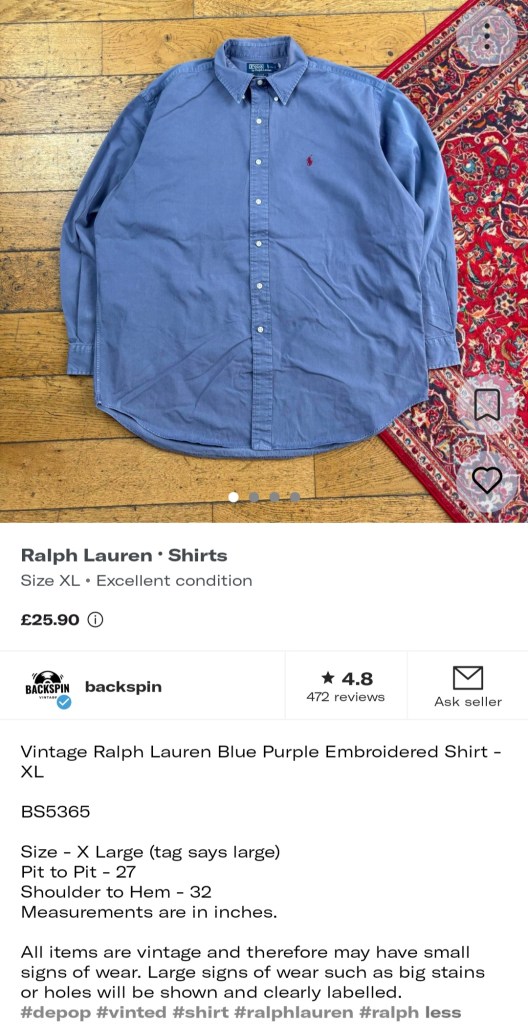
Depop doesn’t really do titles. There’s no separate title field, so we recommend starting your description with a short sentence summarising what you’re selling, just as you would in a title. Save the details for later and stick to the essentials: brand, product type, condition and possibly size.
Next, go into more detail. A list is a great way to set out extra info clearly. Include the size if you haven’t already, and describe the fit too, for example whether it’s true to size or runs large. Restate the condition in more detail. If it’s new, say whether it’s deadstock in original packaging, with tags, or brand new without tags. If it’s pre-owned, give it a rating out of 10 or list any flaws.
Add material details too, as buyers often like to know the exact fabric percentages. This is also the place to include the colourway and SKU, if applicable.
In the next paragraph, add measurements, especially if your photos don’t show them. Giving them in both inches and centimetres is really helpful for buyers.
Then add a short paragraph on your shop policies. Notes like “Instant Buy is on” or “always message before purchasing” tell buyers what to do. Say whether you accept offers or the price is firm, and when you ship, e.g. “all orders before 3pm are sent the same day” or “all orders are shipped within 24 hours”.
Bonus Tip: If a model is wearing the item in your photos, mention their height and usual size in the description.
Finally, you can use up to 5 hashtags, so use them! Take the 5 main keywords from your description and use them as hashtags. Repeating them isn’t a bad thing; it helps your item get seen and rank highly, as the algorithm favours hashtags. Avoid irrelevant tags, though. Some people think they boost visibility across more searches, but they just confuse the algorithm, and any extra views come from buyers who aren’t looking for your item anyway.
The key is a clean, clear description. Keep it brief, skip irrelevant details and don’t spam unrelated tags. Emojis are fine, but use them sparingly.
Enable International Shipping: Use the Worldwide appeal of Depop to your Advantage
The last essential for selling on Depop like a pro is SHIPPING. Many sellers never enable international shipping, and it holds them back from selling in volume. Don’t put all your eggs in one basket by limiting yourself to domestic buyers. Cast your net wide and massively increase your reach.
There’s huge potential you could be missing out on. I was sceptical at first, but honestly, I was shocked at how quickly my store took off once I enabled international shipping. I found lots of North American buyers were interested in vintage and Y2K pieces, as well as Adidas Samba colourways that weren’t available in their region.
International shipping has also helped me sell hundreds of streetwear items, mainly to Australian buyers who don’t have easy access to Supreme drops. UK brands I sell, like Palace and Corteiz, do ship worldwide, but their weekly drops are timed around the UK, so Australian customers often miss out and look elsewhere, such as my Depop store.
So take a leaf out of my book. Unlike eBay, you’re responsible for customs declarations and postage, so it’s a little more complicated and best suited to more experienced sellers. But you won’t regret it, and it’s definitely worth doing!
Refresh Listings Daily: A Secret Hack That Boosts Algorithm Ranking
This wouldn’t be an expert guide if we didn’t spill the tea 🤭. This is a strategy used by top sellers and one of the most gatekept secrets on Depop.
The Depop algorithm rewards sellers who are consistently active, and it also favours recent listings. Refreshing your listings daily ticks both boxes: it shows you’re active every day and makes your listings look new. The algorithm is of course far more complex than this, but it’s a strong, proven strategy.
To do it manually:
- Go to your Depop shop profile.
- Tap the listing you want to refresh.
- Select “Edit”.
- Select “Save” or “Post listing” (you can do this without changing anything).
- Repeat for every listing in your shop, every day.
The only downside is that it’s tedious and time-consuming. There are bots that can do it for you instead. Most are paid, but the one we recommend is completely free. Find out more here.
Related reading: how to ship Depop sales, the Depop fee calculator, the Poshmark fee calculator and our Vinted reselling method.
Final Thoughts
Depop is one of the best marketplaces for selling clothes, whether you’re a reseller or just clearing out your wardrobe. Its algorithm is a closely kept secret, but these tips will help you sell like a pro. Now that you know how to sell clothes on Depop, why not read some of our other guides on succeeding on marketplaces like eBay and Vinted?